
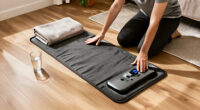
Use this guide to prepare an infrared therapy mat, run a cautious first session, and put it away safely. It is written for beginners who have a mat and controller but need a clear routine for checking the equipment and following the device-specific directions. Allow about 20–40 minutes for unpacking, setup, and a first session; actual session length depends on your manual and comfort.

Get wellness gear delivered free with Prime
- Fast, free delivery on millions of items
- Prime Video, Amazon Music and more included
- Member-only deals all year

72 x 33-Inch Full-Body Red Light Therapy Mat
- ✔ Dimensions: 72 x 33 inches
- ✔ LED count: 1,400
- ✔ Wavelengths: 660 nm red light; 850 nm near-infrared light
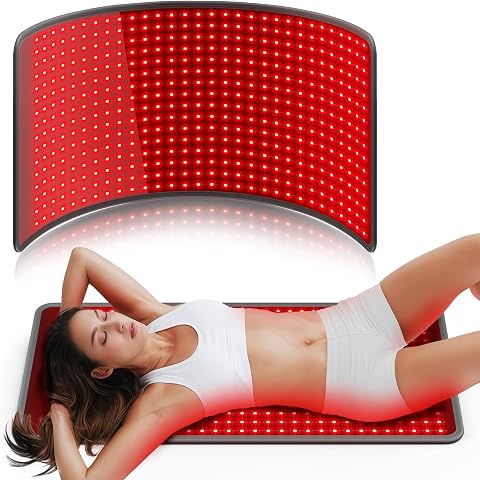
Comfytemp Red Light Therapy Mat, 33 × 17 in, 660 nm and 850 nm
- ✔ Dimensions: 33 x 17 inches
- ✔ LED count: 480
- ✔ Wavelengths: 660 nm and 850 nm
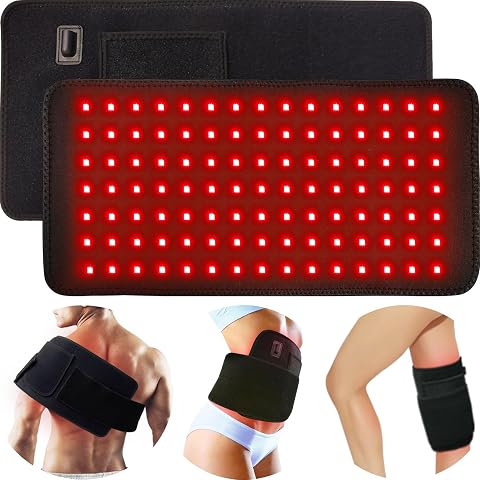
bonodave Corded Red Light Therapy Pad with 660 nm Red and 850 nm Near-Infrared Light
- ✔ Pad dimensions: 16.1 x 7.9 inches
- ✔ Strap dimensions: 35.2 x 4 inches
- ✔ Wavelengths: 660 nm red light and 850 nm near-infrared light
Infrared mats vary in construction, controls, temperature limits, and permitted uses. Follow the instructions supplied with your exact model whenever they differ from general guidance here. These devices produce heat, and a comfortable surface temperature does not rule out burns or other problems. This guide does not replace medical advice or make claims that a mat treats a health condition.
Difficulty: Beginner | Time: 20-40 minutes for setup and a first session
What You’ll Need
Tools & Materials:
- Infrared therapy mat and its original controller
- Manufacturer’s manual, including safety warnings and cleaning instructions
- A flat, dry, stable surface near a correctly rated electrical outlet
- A timer or clock, if the controller does not show session time
- A clean, dry cover or towel only if the manual permits one
Knowledge:
- Basic ability to connect and operate an electrical appliance
- Ability to read the mat’s temperature, time, and cleaning instructions
- Awareness of any personal health or sensation issues that may affect safe heat use
Before using the mat, read its manual and check the label for its electrical rating, intended use, temperature range, and session limits. Ask a healthcare professional before use if you are pregnant, have reduced heat sensitivity or circulation, have a condition affected by heat, or have questions about using heat with an implanted medical device. Do not use the mat on a child or on anyone unable to communicate discomfort unless the manufacturer and a qualified clinician specifically advise it.
Do not use a damaged mat, controller, or power cord. Keep the mat away from water, and do not fold, crease, or cover it unless the manual specifically allows that setup. Leave enough time for the mat to cool before storing it.
72 x 33-Inch Full-Body Red Light Therapy Mat
When the priority is covering more of the body in one setup, this 72 x 33-inch mat is the clear lead in this group. Its 1,400 LEDs and combined 660 nm red and 850 nm near-infrared wavelengths are paired with three modes, five intensity levels, and a timer adjustable from 10 to 90 minutes. Compared with the smaller Comfytemp, its extra length and width make it better suited to lying down for broad-area use rather than positioning a pad over one region at a time.That flexibility comes with practical costs. This is a substantial mat that needs storage and a suitable place to lie flat; buyers looking for a small, easy-to-wrap option should choose bonodave instead. Its wipe-clean, sweat-resistant TPU surface is a useful maintenance detail, while the stated 365-day product support and three years of free parts replacement add support information not listed for the other two products. However, the details do not specify power consumption or recommend a session routine, so we should not assume that more LEDs or a longer timer mean better results. Choose it for its coverage and controls, not an unverified outcome claim.
Pros:
- Large 72 x 33-inch surface is designed for broad coverage.
- Uses both 660 nm red and 850 nm near-infrared light.
- Three modes, five intensity levels, and a 10–90-minute auto-off timer.
- Wipe-clean, sweat-resistant TPU surface and stated parts support.
Cons:
- Requires more storage and setup space than either smaller pad.
- Power consumption and recommended treatment sessions are not specified.
- Broad coverage is less adaptable than bonodave’s wraparound strap for a small target area.
Best for: Buyers who want a large surface for broad-body placement and value adjustable modes, intensity, and session length.
Not ideal for: People with limited storage, anyone needing a pad that wraps around a small body area, or buyers who want stated power consumption and treatment guidance.
Bottom line: We rank this first for its combination of full-body dimensions and the broadest set of session controls, while noting that its size and unspecified usage guidance will not suit everyone.
“We rank this first for its combination of full-body dimensions and the broadest set of session controls, while noting that its size and unspecified usage guidance will not suit everyone.”
Comfytemp Red Light Therapy Mat, 33 × 17 in, 660 nm and 850 nm
Comfytemp is the middle-sized choice in this lineup: its 33 x 17-inch surface offers more room for sitting or lying down than bonodave’s narrow pad, without committing to the full-body footprint of the 72 x 33-inch model. Its 480 LEDs and two listed wavelengths place it in the same broad light category as the other picks, while four modes and three adjustable levels give buyers some control over the setup.The appeal is straightforward operation: connect the pad to its adapter and press a button. That simplicity is a plus for people who do not want to manage a long list of controls, but it should not be confused with cordless convenience. The adapter connection is required, so placement depends on access to power, much like bonodave. Compared with that smaller strapped pad, Comfytemp gives up targeted wraparound positioning in favor of a wider resting surface. Compared with the full-body mat, it offers less coverage and fewer listed intensity levels and timer functions. The description also provides no treatment outcomes or session recommendations, so it is best judged as a practical format choice rather than as evidence of a particular result.
Pros:
- 33 x 17-inch dimensions provide a more substantial resting surface than the bonodave pad.
- Lists 480 LEDs and both 660 nm and 850 nm wavelengths.
- Four light modes and three adjustable intensity levels.
- Simple connection-and-button operation.
Cons:
- Requires connection to its adapter during use.
- Smaller than the full-body mat and not described with an adjustable strap.
- No specific treatment outcomes or recommended session guidance are provided.
Best for: Buyers who want a wider pad for sitting or lying down, with simple button operation and a few adjustable settings.
Not ideal for: People seeking full-body coverage, a wraparound pad for a small target area, or an option that can be used without an adapter connection.
Bottom line: We recommend Comfytemp as the balanced mat-format pick for buyers who want more surface than a targeted wrap but do not need a full-body model.
“We recommend Comfytemp as the balanced mat-format pick for buyers who want more surface than a targeted wrap but do not need a full-body model.”
bonodave Corded Red Light Therapy Pad with 660 nm Red and 850 nm Near-Infrared Light
bonodave is not really competing with the two larger mats on coverage. Its 16.1 x 7.9-inch pad and 35.2-inch elastic strap instead make it the most positionable option here, allowing it to be wrapped around areas such as the back, knee, shoulder, hands, or feet. That targeted fit is a practical advantage over Comfytemp, which is broader but is not described with a strap, and over the full-body model, which is designed to lie flat rather than secure around a smaller area.The controls include a 10 Hz pulse mode and a 30-minute automatic shutoff, and the package lists an adapter and USB controller cable. Its 105 beads contain 315 chips in total, with 660 nm red and 850 nm near-infrared light. At 0.44 lb, it is also the lightest, smallest-format choice in this comparison. The tradeoff is that the compact area cannot provide the broad coverage of either mat, and corded power means it still needs a nearby outlet. The product description makes benefit claims without independent evidence, so we should not treat the pulse mode or chip count as proof of results. Choose this one for positioning flexibility, not for whole-body coverage.
Pros:
- Adjustable strap supports placement around several body areas.
- Combines 660 nm red and 850 nm near-infrared light.
- Includes a 10 Hz pulse mode and 30-minute auto-shutoff timer.
- Adapter and USB controller cable are included.
Cons:
- Small pad area is not suited to broad-body coverage.
- Corded operation requires a nearby power outlet.
- The description provides no independent evidence for claimed benefits.
Best for: Buyers who want to secure a compact light pad around a particular area and value a timer and pulse mode.
Not ideal for: Anyone seeking a wide or full-body mat, cordless use, or independent evidence supporting claimed benefits.
Bottom line: We rank bonodave as the targeted-use pick because its strap solves a placement problem the larger mats do not, though its small coverage area rules it out as a broad mat.
“We rank bonodave as the targeted-use pick because its strap solves a placement problem the larger mats do not, though its small coverage area rules it out as a broad mat.”
As an Amazon Associate we earn from qualifying purchases.
Before You Start
Check that the mat and controller are designed to work together. Use only the supplied or manufacturer-approved controller and accessories; an incorrect controller can cause unsafe heating. Keep the power cord where it will not be pinched, stretched, walked on, or caught under furniture. Do not put the mat on a wet floor, a soft surface that blocks ventilation, or a surface prohibited by the manual.
Start with a low setting and a short session within the device’s instructions. Do not use the mat while asleep, and do not rely on a timer as a substitute for staying alert to heat. Stop immediately if the mat feels painful or excessively hot, or if you notice dizziness, nausea, unusual skin redness, or another concerning symptom. Disconnect it and seek medical help for serious or persistent symptoms.
Step-by-Step Instructions
Step 1: Read the model-specific instructions
Find the manual for your exact mat and read the sections on setup, controller use, maximum temperature, session duration, approved body positions, and cleaning. Identify any warning against using the mat directly on skin, adding a cover, or using it on a bed or other particular surface. Write down the maker’s permitted settings if the controls are not self-explanatory.
Tip: Do not assume that two mats with similar appearance have the same temperature scale or operating limits. If the manual is missing, contact the maker for the correct version before plugging the mat in.
Check: You can identify the permitted setup, operating controls, session limit, and cleaning method for your specific model.
Step 2: Inspect the mat and electrical parts
Unplug the mat before inspecting it. Look over both sides, the seams, plug, cord, and controller for cuts, exposed wires, scorch marks, loose connections, cracks, or signs of moisture. Confirm that the controller fits its connector firmly without forcing it. Do not repair damaged wiring with tape or use a mat with visible damage.
Tip: If the mat has been stored folded, unroll it and check for sharp creases or damaged areas. Follow the maker’s advice about whether it needs to lie flat before operation.
Check: The mat, connector, controller, and cord appear dry and undamaged, and the approved controller connects securely.
Step 3: Choose and prepare a suitable surface
Place the mat flat on a stable, dry surface that the manual permits, such as a floor or bed only when approved for your model. Remove objects that could press into it, and keep the full mat clear of sharp edges and liquids. Position the controller and cord so they remain accessible and cannot be trapped beneath your body, bedding, or furniture.
Tip: Do not fold the mat to fit a smaller area or place it under a heavy mattress unless the manufacturer explicitly permits that arrangement. Restricted airflow or pressure can affect heat and damage the product.
Check: The mat lies as directed, the area is dry and clear, and the cord remains free of tension and obstruction.
Step 4: Connect the controller and power
With the mat switched off, connect the controller as shown in the manual. Plug the power cord into an outlet that matches the mat’s rating, then check that the plug is seated properly. Keep the controller in reach and away from the heated surface if the maker directs you to do so. Leave the power off until you are ready to start.
Tip: Avoid extension cords or power strips unless the manufacturer permits them and they meet the device’s electrical requirements. Never handle plugs with wet hands.
Check: The controller is connected to the correct port, the outlet rating matches the label, and the cord is routed safely.
Step 5: Set up for a cautious first session
Choose a position permitted by the manual and a light or low setting appropriate for a first use. Set a timer within the maker’s session limit. Wear light clothing or use a permitted barrier if the manual requires or allows one; do not add a towel, blanket, or extra layer unless approved. Stay awake and able to reach the controls throughout the session.
Tip: Begin more conservatively than you think you need to. Heat can build over time, and impaired sensation may make it harder to detect excessive warmth.
Check: The setting and timer stay within the instructions, your position is approved, and you can switch the mat off without getting up or reaching across a hazard.
Step 6: Start the mat and check its response
Switch on the mat using the controller and confirm that the display or indicator behaves as described in the manual. Remain alert as the mat warms; do not increase the setting simply because it does not feel hot immediately. Follow any warm-up time stated by the maker, and turn the mat off if the controller shows an error, the heat seems uneven, or you detect an unusual smell or sound.
Tip: Some models take time to warm, and some have displays that show a target setting rather than the mat’s exact surface temperature. Use the manual to interpret the readout.
Check: The controller shows normal operation, the mat warms in the manner described for the model, and no error, odor, or abnormal hot spot appears.
Step 7: Complete the session and assess your comfort
Stay awake and check how you feel during the session. End it when the timer expires or sooner if the heat becomes uncomfortable. Switch the mat off before changing position or leaving it. Check your skin for persistent redness, pain, blistering, or another unexpected reaction; stop using the mat and seek medical advice if symptoms concern you.
Tip: Do not extend a session or raise the setting to make up for time missed. Follow the maker’s limits each time, even if the first use felt mild.
Check: You stop within the prescribed time, experience no concerning symptoms, and can switch the mat off promptly.
Step 8: Unplug, cool, and store the mat
Switch the controller off, unplug the mat by holding the plug rather than pulling the cord, and let the mat cool fully on a clear surface. Clean it only by the method stated in the manual; do not immerse it or spray liquid onto electrical parts. Once cool and dry, roll or store it in the approved way, without sharp bends, heavy objects on top, or strain on the cord.
Tip: Do not store a warm or damp mat. If the manual does not describe folding, rolling, or cleaning, ask the manufacturer rather than guessing.
Check: The mat is disconnected, fully cool, clean and dry as directed, and stored without a tight crease or pressure on its components.
Common Mistakes to Avoid
- Using a generic session time or temperature instead of the model’s limits. — Check the manual and controller directions for your exact model before every new setting or use. Start low and stay within the stated session limit.
- Folding, covering, or placing the mat on an unapproved surface. — Set it up exactly as the manual describes. Do not improvise with extra blankets, thick bedding, or a folded mat because trapped heat or pressure may create a hazard.
- Using the mat while asleep or leaving it unattended. — Remain awake, keep the controls accessible, and stop when the timer ends. A timer does not make unattended use safe.
- Continuing despite pain, excessive heat, or a skin reaction. — Turn the mat off promptly when discomfort or unusual symptoms occur. Do not restart until the cause is clear; contact a clinician if symptoms persist or are severe.
Troubleshooting
Problem: The controller does not turn on.
Solution: Switch off and unplug the mat. Check that the outlet works and that the controller connector is fully seated in the correct port. Confirm the power switch and setup steps in the manual. Do not open the controller or try an unapproved replacement. If it still fails, contact the manufacturer.
Problem: The mat does not seem to warm.
Solution: Allow only the warm-up time specified in the manual and confirm that the selected setting is active. Check for a displayed error and verify that the controller is approved for the mat. Do not raise the setting repeatedly or assume the mat is faulty based only on touch; ask the maker if its normal operation remains unclear.
Problem: One area feels much hotter than the rest, or the mat smells unusual.
Solution: Switch it off and unplug it immediately. Let it cool on a clear surface and do not use it again until the manufacturer has advised you. A persistent hot spot, burning odor, sparking, or damaged cord can indicate an electrical or heating fault.
Problem: The mat or controller displays an error or switches off unexpectedly.
Solution: Turn the unit off, unplug it, and consult the manual’s error-code or shutdown instructions. Check only user-serviceable connections after the mat has cooled. Do not bypass a safety feature; contact the manufacturer if the error returns.
What Success Looks Like
You have completed a safe first-use routine when the mat is undamaged, set up on a permitted dry surface, connected to its approved controller and a suitable outlet, and operated within the maker’s temperature and time limits while you remained awake. The controller should behave normally, the mat should have no unexplained hot spots or unusual odor, and you should have no concerning symptoms. Afterward, the mat should be switched off, unplugged, cooled, cleaned as directed, and stored properly.
This verifies correct setup and operation, not a medical benefit. Stop use and seek appropriate advice if the mat causes pain, persistent skin changes, or other worrying symptoms.
Next Steps
Before each session, inspect the mat and cord, confirm the setup is dry and clear, and review the manual if you have changed locations or accessories. Keep the manual and manufacturer contact details with the device. Follow the maker’s cleaning and storage directions, and stop using the mat if it becomes damaged or behaves differently from its normal operation. Ask a healthcare professional about personal heat-use concerns rather than using the mat to replace prescribed care.
Frequently Asked Questions
How long should I use an infrared therapy mat?
Use only the session duration specified for your model. There is no single duration that applies to every mat. For a first session, use a cautious setting and do not exceed the manual’s limit; stop earlier if you feel uncomfortable or unwell.
Can I lie directly on the mat?
Check the manual for approved body positions and whether clothing or a barrier is required. Do not assume direct skin contact is allowed. Use only a cover or towel if the manufacturer permits it, since an unapproved layer can change heat transfer.
Can I use an infrared mat every day?
Follow the frequency and session limits in your model’s instructions. Ask a healthcare professional before regular use if you have reduced heat sensitivity, circulation concerns, a condition affected by heat, are pregnant, or use an implanted medical device.
Can I sleep on the mat?
No. Do not use the mat while asleep or leave it running unattended. You need to stay awake so you can notice discomfort and switch it off if the mat becomes too hot or shows a problem.
What should I do if I feel dizzy or my skin stays red?
Turn the mat off and unplug it. Move away from the heat, and do not use the mat again while symptoms continue. Seek medical advice for persistent redness or dizziness, and get urgent help for severe symptoms, burns, or fainting.
Columbus Day / Indigenous Peoples' Day Picks
long weekend sales
As an affiliate, we earn on qualifying purchases.